
Documentation
Budget Allocation
Description
Budget Allocation is a feature () that keeps track of allocations for each of the monthly budget items. Budget Items are managed in Budget Setup.
BUDGET ALLOCATION is also a built-in category through which all of our budget allocations pass through. This allows us to capture and keep track of how much has been allocated for budget items on a monthly basis.
Each of the budget items must have an identically named category.
To allocate funds for a budget item, we first have to move those funds into BUDGET ALLOCATION category via Category Transfer ().
When allocating funds for budget items, we are transferring funds from the BUDGET ALLOCATION category to other categories associated with those budget items. This process happens in the background.
Using Budget Allocation
To demonstrate how Budget Allocation feature works, let's use our simple budget example. Currently budget allocations look like this:
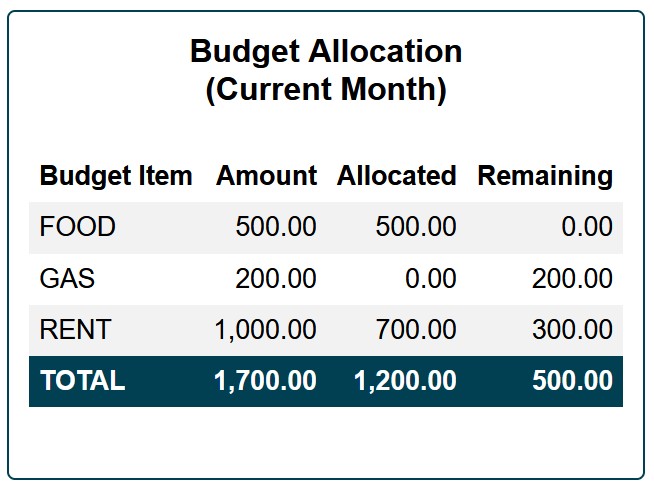
Let's say that we want to allocate $100 for gas. Let's take a look at our current category totals and decide where that money is going to come from. We can view current category totals in Overview ().
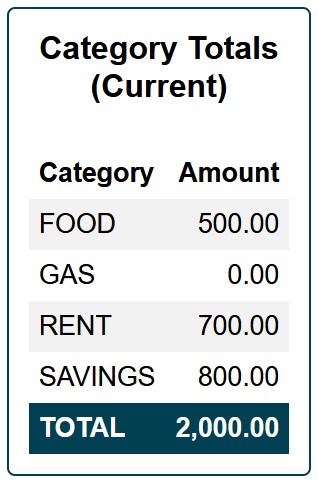
We have some spare funds in SAVINGS category so we decide to pull $100 from SAVINGS and use that to allocate money for gas. In practice it is up to us to decide from which category these funds will come from. Usually most people will allocate funds towards their budget items when they get paid. That income can be initially put into the TEMP category and then moved to BUDGET ALLOCATION category and/or other categories. To keep this example as short and as simple as possible, we will use SAVINGS.
The first step will be to go to Category Transfer () and transfer $100 from SAVINGS to BUDGET ALLOCATION.
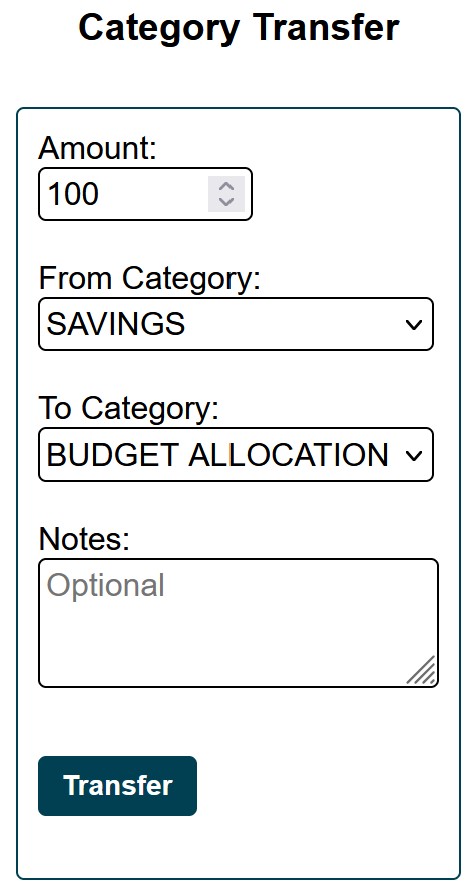
After the transfer has been made, the BUDGET ALLOCATION category will have $100.
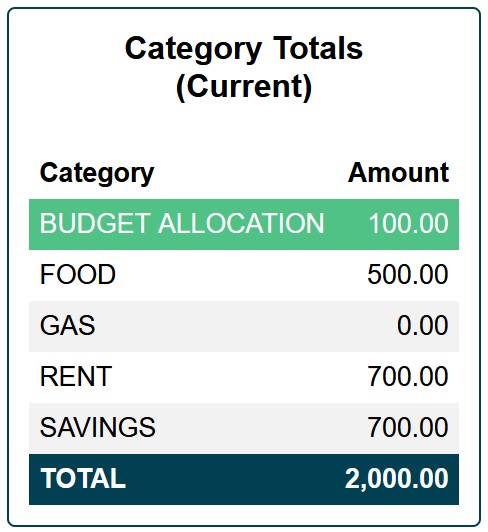
In the second step we will use Budget Allocation feature () to allocate those $100 we just transferred from SAVINGS to BUDGET ALLOCATION. Allocation will be made to the GAS budget item.
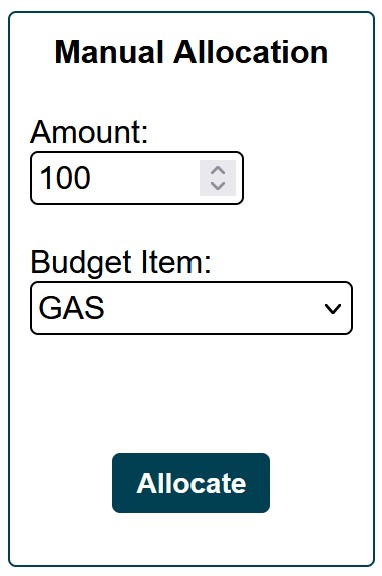
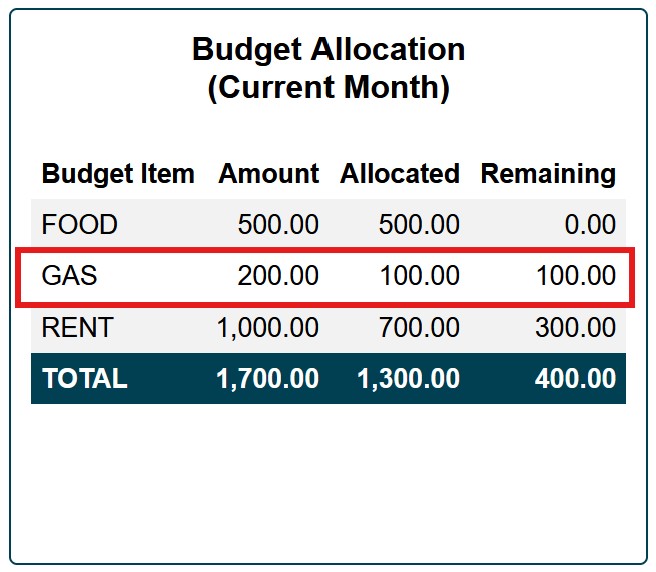
Once the allocation has been made, the Budget Allocation will reflect how much we have allocated for gas this month. It will also show how much we still need to allocate this month under Remaining column.
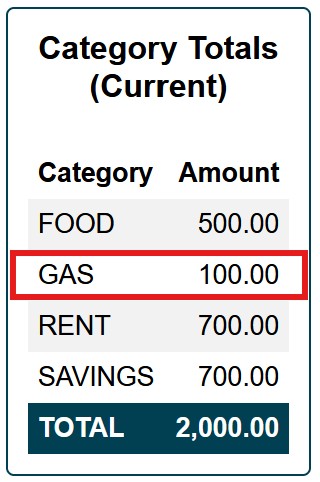
Looking at Category Totals (), we can see that GAS category has $100 in it. Now we have $100 to spend on gas this month.
But why not just do a category transfer and move funds directly from SAVINGS into GAS?
While it is possible, the problem with such an approach is that the amount we transfer this way will not be captured in Budget Allocation. It will be hard to keep track of how much we have transferred and how much more we still need to transfer for any buget item. Budget Allocation keeps track of everything that has been allocated towards our monthly budget as well as provide historical record of how much has been allocated on a monthly basis in the past.
Using Category Transfer to move funds between categories is perfectly acceptable when categories are not part of a monthly budget (i.e. categories unrelated to budget items).
Conclusion
In summary, what we have done was move $100 from the SAVINGS category to the BUDGET ALLOCATION category. Then we used Budget Allocation feature, which has transferred (in the background) $100 from the BUDGET ALLOCATION category to the GAS category and captured the amount allocated.
Description
Budget Allocation is a feature () that keeps track of allocations for each of the monthly budget items. Budget Items are managed in Budget Setup.
BUDGET ALLOCATION is also a built-in category through which all of our budget allocations pass through. This allows us to capture and keep track of how much has been allocated for budget items on a monthly basis.
Each of the budget items must have an identically named category.
To allocate funds for a budget item, we first have to move those funds into BUDGET ALLOCATION category via Category Transfer ().
When allocating funds for budget items, we are transferring funds from the BUDGET ALLOCATION category to other categories associated with those budget items. This process happens in the background.
Using Budget Allocation
To demonstrate how Budget Allocation feature works, let's use our simple budget example. Currently budget allocations look like this:
Let's say that we want to allocate $100 for gas. Let's take a look at our current category totals and decide where that money is going to come from. We can view current category totals in Overview ().
We have some spare funds in SAVINGS category so we decide to pull $100 from SAVINGS and use that to allocate money for gas. In practice it is up to us to decide from which category these funds will come from. Usually most people will allocate funds towards their budget items when they get paid. That income can be initially put into the TEMP category and then moved to BUDGET ALLOCATION category and/or other categories. To keep this example as short and as simple as possible, we will use SAVINGS.
The first step will be to go to Category Transfer () and transfer $100 from SAVINGS to BUDGET ALLOCATION.
After the transfer has been made, the BUDGET ALLOCATION category will have $100.
In the second step we will use Budget Allocation feature () to allocate those $100 we just transferred from SAVINGS to BUDGET ALLOCATION. Allocation will be made to the GAS budget item.
Once the allocation has been made, the Budget Allocation will reflect how much we have allocated for gas this month. It will also show how much we still need to allocate this month under Remaining column.
Looking at Category Totals (), we can see that GAS category has $100 in it. Now we have $100 to spend on gas this month.
But why not just do a category transfer and move funds directly from SAVINGS into GAS?
While it is possible, the problem with such an approach is that the amount we transfer this way will not be captured in Budget Allocation. It will be hard to keep track of how much we have transferred and how much more we still need to transfer for any buget item. Budget Allocation keeps track of everything that has been allocated towards our monthly budget as well as provide historical record of how much has been allocated on a monthly basis in the past.
Using Category Transfer to move funds between categories is perfectly acceptable when categories are not part of a monthly budget (i.e. categories unrelated to budget items).
Conclusion
In summary, what we have done was move $100 from the SAVINGS category to the BUDGET ALLOCATION category. Then we used Budget Allocation feature, which has transferred (in the background) $100 from the BUDGET ALLOCATION category to the GAS category and captured the amount allocated.